Best Cloud Storage Services Compared: Price & Features (2026 Personal Use Guide)

The cloud storage market in 2026 has hit an annoying tipping point. Your phone flashes a storage warning at the exact moment you try to capture a memory. Apple quietly nudges you that your iCloud sync is paused. Google nags you about your Gmail space being 87% full.
If you are a modern freelancer, photographer, or an everyday user trying to clean local clutter, navigating “subscription drag” is exhausting. The monthly fee setup that started out looking cheap a few years ago now feels like a permanent rent on your memories.
This is not an enterprise white paper or a lab test packed with artificial upload benchmarks. This is a practical, real-world comparison of the best cloud storage for personal use, specifically tailored to help you navigate ecosystem lock-ins, evaluate lifetime deals, avoid catastrophic data traps, and protect your privacy from sneaky data-scraping AI models.
The 2026 Cloud Storage Landscape at a Glance
For those in a hurry, here is the no-nonsense breakdown of how the top contenders stack up right now across core metrics, privacy standards, and financial viability.
| Service | Free Tier | Cheapest Paid Tier | Real Cost for 1TB–2TB | Zero-Knowledge Encryption? | Platform Compatibility | Best Unique Trait |
|---|---|---|---|---|---|---|
| pCloud | Up to 10GB | 500GB for $4.99/mo | 2TB Plan: $9.99/mo or $399 Lifetime | Yes (Via Paid Crypto Add-on) | Windows, Mac, iOS, Android, Linux | Unrivaled long-term value via lifetime options. |
| Google Drive | 15GB (Shared) | 100GB for $1.99/mo | 2TB Plan: $9.99/mo (Google AI Pro) | No (Server-side keys held by Google) | Android, iOS, Windows, Mac, Web | Ultimate ecosystem convenience for Google Docs & Photos. |
| iCloud+ | 5GB | 50GB for $0.99/mo | 2TB Plan: $9.99/mo | Yes (Optional via Advanced Data Protection) | iOS, Mac, Web (Weak Windows support) | Seamless background integration for all-Apple users. |
| OneDrive | 5GB | 100GB for $19.99/yr | 1TB Plan: $99.99/yr (Bundled with M365) | No (Server-side keys held by Microsoft) | Windows, Mac, Android, iOS | Best value package if you already rely on MS Office apps. |
| Sync.com | 5GB | N/A | 5TB Plan: $28/mo | Yes (Default out-of-the-box) | Windows, Mac, iOS, Android, Web | Total client-side privacy without configuration. |
| MEGA | 20GB | Varies | 2TB Plan: ~$10.99/mo | Yes | Windows, Mac, iOS, Android, Linux | Most generous and reliable standalone free tier. |
1. pCloud — Best Overall Value and Inexpensive Cloud Storage
If your primary objective is to kill off monthly SaaS subscription fatigue, pCloud is the most logical destination in 2026. While other platforms force you onto a never-ending billing wheel, pCloud remains famous for its highly stable, heavily optimized Lifetime Plans.
[Check pCloud 2026 Pricing & Lifetime Deals]The 2026 Cost Calculation
pCloud’s introductory entry points sit at $49.99/year for 500GB or $99.99/year for 2TB. However, the real prize is the one-time upfront architecture:
- 500GB Lifetime: $199
- 2TB Lifetime: $399
- 10TB Lifetime: $1,190
If you plan to use cloud storage for longer than 36 to 40 months, the lifetime math works out heavily in your favor. Instead of paying Apple or Google a recurring ten-dollar bill forever, you purchase a digital asset, cross it off your monthly overhead ledger, and move on.
Performance & Polish
The desktop client handles local drive space elegantly using a “virtual drive” mechanism. Rather than hard-mirroring every byte down to your local laptop storage, files live safely in the cloud but display locally inside your folder architecture. When you click to open a 4K video asset, it streams directly with zero local friction. This feature alone makes it a massive win for managing storage without downgrading app speeds.
The Security Caveat
Out of the box, pCloud relies on standard server-side encryption. This means they manage the decryption keys. If you require absolute, zero-knowledge privacy where no corporate entity can peek inside your data, you must purchase the pCloud Crypto add-on ($4.99/month or a $150 one-time lifetime payment).
- Pros: Cross-platform parity (even includes high-grade Linux support), built-in audio/video streaming engines, flawless camera auto-upload.
- Cons: Client-side encryption is hidden behind a separate paywall; the brand name still elicits giggles when spoken aloud in a quiet room.
2. Google Drive — The Champion of Ecosystem Convenience
For the vast majority of online operators, freelancers, and small teams, Google Drive is a default choice because it acts as the digital connective tissue of modern work.
Seamless Integration
If you are running an online side hustle, you are likely already using Gmail, Docs, Sheets, and Slides. Google Drive doesn’t ask you to change your habits; it simply runs silently underneath them. For instance, if you are a freelance professional managing multiple client deliverables, pairing your collaborative cloud assets with specialized optimization structures—like selecting the best AI tools for Fiverr sellers can easily double your daily creative output.
The 2026 AI Overhaul
Google One has largely evolved into the Google AI Pro ecosystem. The legacy storage-only options still exist (100GB for $1.99/mo), but the premium tiers are explicitly bundled with artificial intelligence. The 2TB tier ($9.99/mo) now grants access to Gemini 3 Pro modeling and Google’s native VPN architecture.
The Ultimate Trade-Off: Privacy
Google functions on standard server-side setups. They hold the keys. They index your files for search accessibility. While they state your personal files are not actively harvested for core advertising algorithms, using their platform requires a high degree of trust. If you are backing up tax records, corporate contracts, or raw biometric data scans, the convenience costs you absolute cryptographic privacy.
- Pros: Outstanding web-native collaboration tools; generous 15GB free storage; immediate sync times.
- Cons: No built-in zero-knowledge protocol; shared space across Gmail attachments means heavy emails eat your storage quota quickly.
3. iCloud+ — The Native Choice for All-Apple Environments
If your entire hardware landscape is branded with a half-eaten fruit—iPhone, iPad, Mac Studio, MacBook Air attempting to force a third-party cloud app to act as your primary backup engine is an uphill battle against system permissions.
Unmatched Background Optimization
iCloud+ handles background operational tasks better than any competitor inside the iOS ecosystem. Photos slide up to servers while you sleep. Full system backups happen invisibly. Files inside your native folder structures mirror cleanly without trigger errors or file-lock conflicts.
Pricing Structure
Apple keeps the monthly financial stakes manageable for typical consumer needs:
- 50GB: $0.99/month
- 200GB: $2.99/month
- 2TB: $9.99/month
- (Higher tiers scale out all the way to 12TB for $59.99/month for heavy-duty video houses).
For better lifestyle valuation, look toward the Apple One Bundle, which wraps iCloud storage together with Apple Music, TV+, Arcade, and News into a single monthly bill.
Ecosystem Limitations
Step one millimeter outside of Apple’s walled garden, and the experience breaks down. The native Windows app has improved significantly but still feels clunky. The web client interface is Spartan at best. Furthermore, sharing files externally with Windows or Android users feels noticeably more restricted compared to Google’s open link ecosystem.
Privacy Upgrade
Historically, Apple held the restoration keys to your backups. However, by toggling on Advanced Data Protection inside your device settings, you can flip iCloud into a true zero-knowledge, end-to-end encrypted storage container. If you lose your primary password and recovery key under this setting, Apple cannot rescue your data.
- Pros: Native system-level speed; clean media archival; optional true end-to-end encryption.
- Cons: Severely crippled utility on Android or Linux platforms; basic free tier is stuck at an archaic 5GB.
4. Microsoft OneDrive — The Enterprise Workhorse
If you are paying a recurring fee for a Microsoft 365 Personal or Family subscription, you already own a massive cloud allocation without realizing it.
The Office Bundle King
A standalone OneDrive plan sits at 100GB for $19.99/year. However, the true value proposition manifests when combined with productivity software. A Microsoft 365 Personal subscription ($99.99/year) lands you 1TB of full-speed storage alongside desktop versions of Word, Excel, PowerPoint, and Outlook.
Files On-Demand Functionality
OneDrive pioneered the Files On-Demand architecture that saves cramped laptop solid-state drives from running out of disk space. It leaves small visual “ghost placeholders” inside your Windows Explorer. The file takes up zero physical bytes on your device until you double-click it, triggering an instant down-stream pull.
- Pros: Massive built-in financial value for Microsoft office software users; deep Windows OS integration; Personal Vault feature adds a biometric, extra-encrypted layer for sensitive folders.
- Cons: Interface can feel enterprise-focused and clinical; Mac synchronization clients occasionally suffer from folder-refresh lag.
5. Sync.com & MEGA — The Privacy & Free Alternatives
For users who refuse to use big-tech ecosystems due to data harvesting concerns, two independent options deserve serious consideration.
Sync.com: Secure Personal Cloud Storage
Sync.com treats zero-knowledge security as a baseline mandate, not an expensive premium add-on. Every single file dropped into Sync is encrypted locally on your machine before it hits the network wire. It is arguably the safest consumer storage choice for delicate medical forms, tax write-offs, and financial records. The trade-off is speed: because client-side mathematical processing happens continuously under the hood, syncing large media libraries takes longer than on Google or pCloud.
MEGA: Generous 20GB Free Storage
If your primary budget right now is exactly zero dollars, MEGA is the cleanest solution. It offers a permanent 20GB free storage tier that is entirely user-encrypted. Unlike alternative free platforms filled with aggressive redirect ads or hidden bandwidth limits, MEGA delivers functional, highly reliable desktop and mobile applications alongside a robust privacy stance.

Deep Dive: Best Cloud Storage for Photographers and Personal Photos
Choosing a platform changes completely when you shift from basic Word documents to managing millions of megabytes of raw image data. Photographers and content creators storing massive project files must treat their storage framework carefully.
[Visual Alert: Best Cloud Storage for Photographers & Creative Portfolios]The Photo Sync Conflict: Google Photos vs. iCloud+
If you are managing image assets strictly on an iPhone, iCloud+ is incredibly frictionless. It maintains an exact mathematical replica of your local phone gallery in the cloud. When space runs low on your physical device, it offloads the heavy raw versions to the cloud, leaving a lightweight thumbnail preview behind.
However, if you work across mixed systems (e.g., an iPhone paired with a Windows editing desktop), Google Photos wins the category. Its semantic AI organization engine is far superior to Apple’s. You can search for abstract terms like “dog on a beach in summer” or “blurry document scan,” and Google’s computer-vision mapping identifies the image with near-perfect accuracy.
The Professional Option: pCloud for Photographers
For serious content creators who need to distribute raw files to external clients, pCloud for photographers is a silent killer feature. It features zero file-size limits and houses a built-in uncompressed media player. You can text an asset link to a client, and they can preview raw portfolio files or stream a video export directly in full 4K without forcing a massive local download first.
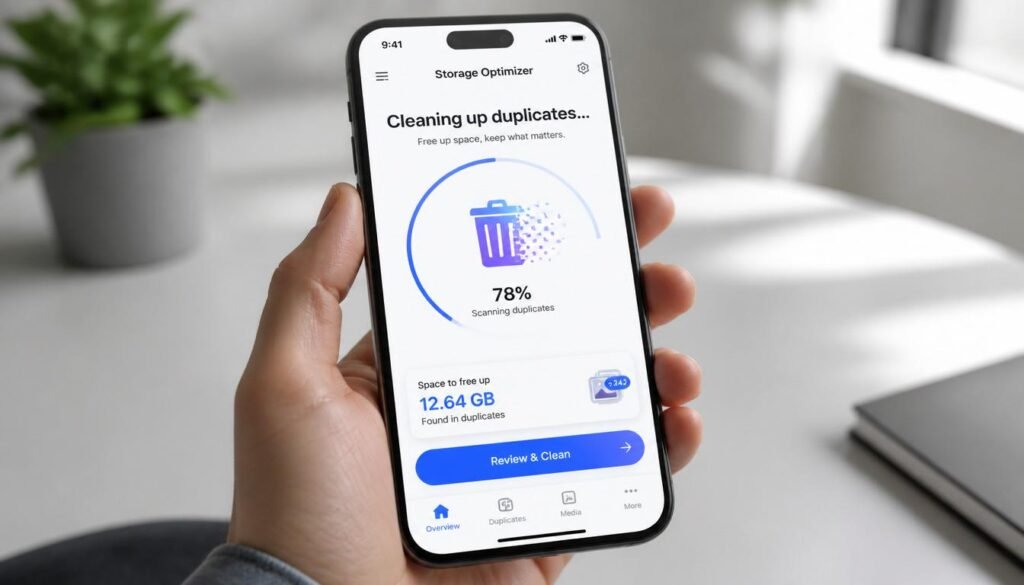
How to Clear Cloud Storage Space Without Deleting Your Memories
Before you pull out your credit card to buy an expansive multi-terabyte paid tier, you should see if you can reclaim what you already own. Often, running out of space is just a failure of digital maintenance. Here is how to safely purge the waste:
- The Hidden Gmail Tax: Open your Google Drive and search for
has:attachment larger:10M. You will likely discover ancient email chains containing massive PDF manuals or uncompressed video attachments from five years ago that are quietly strangling your unified Google One quota. - Target the WhatsApp/Messaging Cache: Go to your mobile backup settings. Messaging apps frequently compress and auto-save junk memes, duplicate video shares, and massive family group-chat videos directly into your camera roll, which then immediately syncs up to your paid iCloud or Google accounts. Turn off “Save to Camera Roll” for non-essential communication apps.
- Run Archive Cleanups: Major cloud sync platforms include an option called “Selective Sync” or “Archive Mode.” Use it to permanently change your heaviest desktop folders (like completed past projects or raw video archives) to cloud-only status, freeing up your local laptop drive.
Security Alert: How to Avoid Modern Cloud Storage Scams
As the value of digital data rises, bad actors have targeted cloud storage users with sophisticated social engineering schemes. Protection requires understanding the landscape:
- The “Storage Full” Phishing Trap: The most rampant cloud storage email scam involves a deceptive notification designed to mimic an official alert from iCloud or Google. The email screams that your account is about to be deleted within 24 hours due to non-payment or full storage. It provides a prominent link to update your card info. Clicking it lands you on a cloned login screen designed to hijack your master credentials. Always check your account status directly via your device’s native system settings app—never via an email hyperlink.
- The “1TB Free Storage” Scam: Be wary of minor, unknown software vendors offering massive, completely free multi-terabyte cloud drives. These platforms often monetize by injecting invasive banner ads into your dashboard, selling your behavioral telemetry to data brokers, or completely lacking standard transport encryption, leaving your personal images exposed to public web scrapers.
The Verdict: Which Cloud Storage System Should You Choose?
The right tool depends on which platform compromise matches your existing everyday habits:
- Choose pCloud if you want to eliminate recurring monthly subscription costs, need high-speed file distribution capabilities for creative media, or love the idea of an affordable lifetime layout.
- Choose Google Drive / Google AI Pro if you are heavily dependent on Google Docs and prioritize collaborative ease of use over deep cryptographic isolation.
- Choose iCloud+ if your entire hardware world belongs inside Apple’s walled garden and you want your system file backups to run with absolute zero maintenance.
- Choose OneDrive if you are actively utilizing Microsoft Word, Excel, or PowerPoint every single day for professional or educational purposes.
- Choose Sync.com if you are storing sensitive medical documents, corporate legal papers, or financial data that require strict zero-knowledge security.
Frequently Asked Questions (FAQ)
Can I buy cloud storage permanently instead of paying monthly?
Yes. Platforms like pCloud and Internxt offer dedicated lifetime plans where you make a single upfront investment (e.g., $399 for 2TB) to secure permanent space without ongoing recurring costs.
Which cloud storage service offers the safest encryption model?
Sync.com and Proton Drive offer full client-side, zero-knowledge encryption by default across all files. Mainstream options like Google Drive and OneDrive hold your encryption keys on their servers, meaning their engineers or automated scanning scripts could theoretically parse your contents.
What happens if a lifetime cloud company goes out of business?
This is the inherent risk of any lifetime software package. To mitigate this risk, stick to well-established, mature companies like pCloud, which has maintained highly profitable operations and self-owned server arrays for over a decade, rather than choosing newly launched startups offering unsustainably cheap lifetime deals.
Is zero-knowledge encryption worth the extra execution lag?
If you are storing highly sensitive items like passport scans, tax profiles, or private intellectual property, absolutely. If your storage is almost exclusively utilized for backing up family vacation photos, standard server-side security (like Google Drive or iCloud) offers more than enough security along with faster processing.
Related Reading on Globe Hustle
- Best AI Tools for Fiverr Sellers: Double Your Output Instantly
- Earn $500/Month: How Students Make Money with Digital Assets Using AI Platforms
Yes. Platforms like pCloud and Internxt offer dedicated lifetime plans where you make a single upfront investment (e.g., $399 for 2TB) to secure permanent space without ongoing recurring costs.
Sync.com and Proton Drive offer full client-side, zero-knowledge encryption by default across all files. Mainstream options like Google Drive and OneDrive hold your encryption keys on their servers, meaning their engineers or automated scanning scripts could theoretically parse your contents.
This is the inherent risk of any lifetime software package. To mitigate this risk, stick to well-established, mature companies like pCloud, which has maintained highly profitable operations and self-owned server arrays for over a decade, rather than choosing newly launched startups offering unsustainably cheap lifetime deals.
If you are storing highly sensitive items like passport scans, tax profiles, or private intellectual property, absolutely. If your storage is almost exclusively utilized for backing up family vacation photos, standard server-side security (like Google Drive or iCloud) offers more than enough security along with faster processing.