
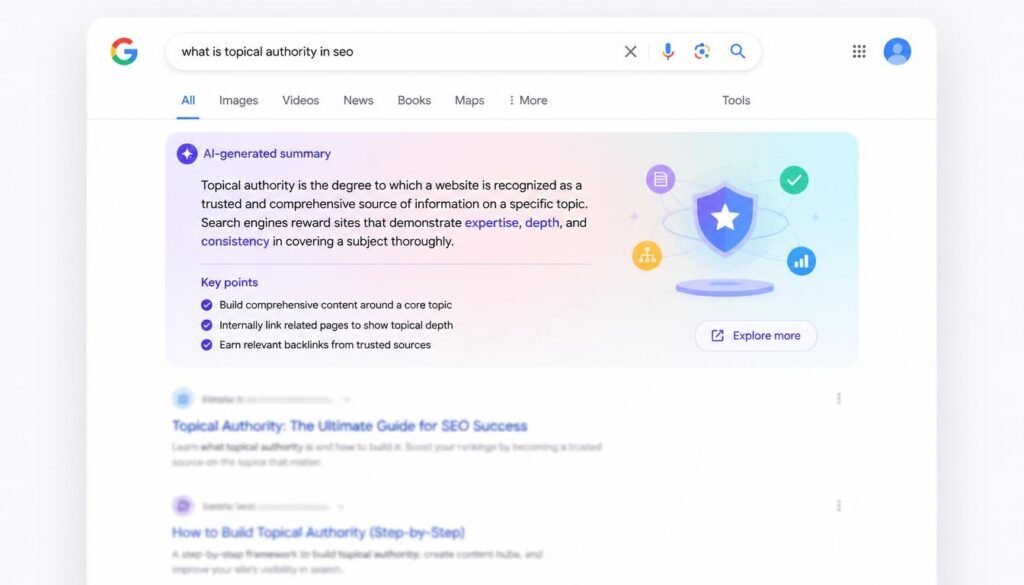
📌 Direct Answer: Google AI Overview is an AI-generated summary that appears at the top of search results, built from Gemini and your search query. It currently shows up on roughly 48% of all Google searches. You can disable it through Search Labs, browser extensions, or “Web” filter tricks, and you can optimise your content for it by following standard E-E-A-T and structured-data best practices because, per Google’s own documentation, there’s no special hack required.
Quick Answer Table
| Question | Short Answer |
|---|---|
| What is Google AI Overview? | An AI-generated summary box at the top of Google Search, powered by Gemini |
| How common is it now? | Appears on about 48% of all queries as of early 2026 |
| Can I turn it off permanently? | Not officially — but Search Labs, the “Web” filter, and browser extensions get close |
| Does it hurt website traffic? | Yes — organic CTR drops by roughly 35-61% on queries where it appears |
| Can I optimise content to appear in it? | Yes, indirectly — strong SEO fundamentals and citation-worthy content increase your odds |
| Is it accurate? | Mostly, but Google itself warns it “can and will make mistakes” |
What Is Google AI Overview, Exactly?
Google AI Overview is the AI-written summary that now sits above the traditional blue links on many search results pages. Instead of scrolling through ten separate websites, you get a synthesised answer pulled from multiple sources, with links underneath if you want to dig deeper.
It isn’t a separate product bolted onto Search it’s built directly into Google’s core ranking system and powered by a custom version of Gemini 2.5. Behind the scenes, Google uses a technique called query fan-out: your single question gets split into several related sub-queries, each searched simultaneously, and the results get stitched into one coherent answer. This is also why a page that never targeted your exact keyword can still get cited it might answer one of the hidden sub-questions Google generated on the fly.
Fun fact: Google processes over 8.5 billion searches a day, and AI Overview now touches nearly half of them. That’s a feature that went from a 2024 experiment to a default search behaviour for billions of people in under two years.
How Common Is AI Overview in 2026? (The Real Numbers)
This is where the data gets genuinely interesting and a little contradictory, depending on which study you read.
- AI Overviews now appear on approximately 48% of tracked queries as of February 2026, up from 31% a year earlier
- Prevalence isn’t even across topics: it shows up far more on informational searches than on shopping or navigational ones
- AI Overviews trigger on healthcare queries roughly 88% of the time and education queries about 83% of the time, compared with just 37% for entertainment searches
- The rollout wasn’t a straight line — prevalence peaked at around 24.61% of queries in July 2025 before dipping to about 15.69% by November 2025, then climbing again into 2026
In short: if you searched something health-related or how-to-related this week, there’s a very strong chance you saw an AI Overview before you saw a single blue link.
Does Google AI Overview Actually Hurt Website Traffic?
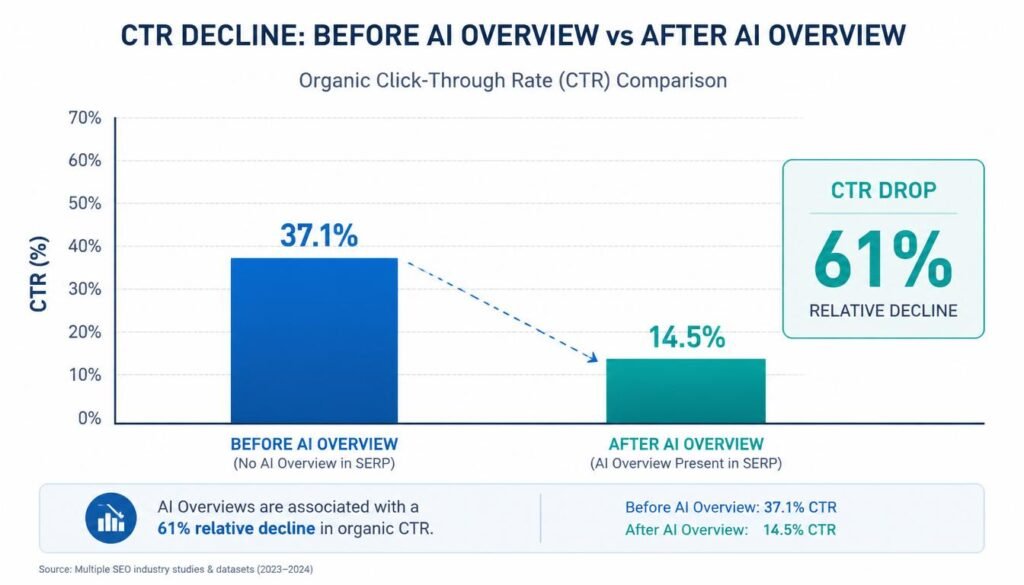
Short answer: yes, substantially though the picture is more nuanced than the scary headlines suggest.
The Click-Through Rate Collapse
Multiple independent studies, using different methodologies, all point the same direction:
- Seer Interactive’s September 2025 study found organic click-through rate fell from 1.76% to 0.61% — a 61% decline — on queries where AI Overviews appeared
- Ahrefs analysed 300,000 keywords and found a 58% drop in click-through rate for the top-ranking page once an AI Overview was present, comparing December 2023 to December 2025
- Across 12 different studies reviewed by industry analysts, the measured CTR decline ranged from 15% to as high as 89%, depending on methodology and query type — but every single study found a decline. None found an increase
But There’s a Recovery Story Too
Here’s the part most “AI Overview is killing SEO” articles leave out: the decline has started to level off.
Seer Interactive’s 2026 update covering 53 brands, 5.47 million tracked queries, and 2.43 billion organic impressions showed organic CTR on AI Overview queries climbing from a floor of about 1.3% in December 2025 to roughly 2.4% by February 2026, an 85% rebound in just two months.
The Citation Effect: Your Real Lever for 2026
The single most actionable data point in this entire topic is this: getting cited inside the AI Overview changes your outcome completely.
Brands cited in AI Overviews earn approximately 120% more organic clicks per impression than uncited brands targeting the same queries, according to Seer Interactive’s latest analysis. Other studies put the citation bonus at 35% more organic clicks and 91% more paid clicks. Either way, the conclusion is identical: being invisible to AI Overview is now far worse for your traffic than ranking #4 used to be.
| Metric | Cited Brands | Non-Cited Brands |
|---|---|---|
| Organic click lift | +35% to +120% | Baseline (suffers full CTR decline) |
| Paid click lift | +91% | Baseline |
| Visibility on the SERP | Appears in AI box + organic listing | Appears in organic listing only, often below the fold |
How to Turn Off Google AI Overview (Step-by-Step)
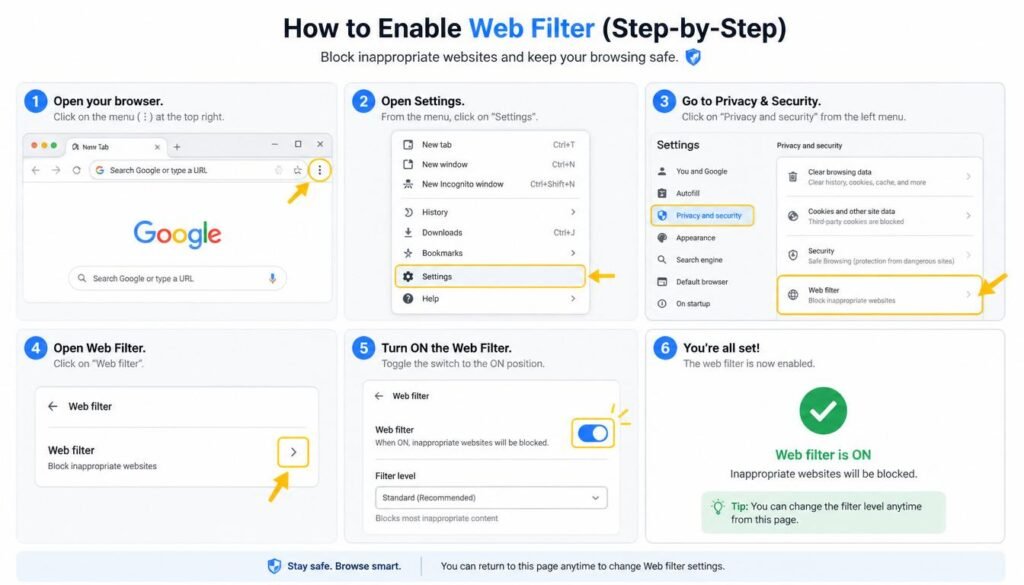
If you’re in the “I just want my normal search results back” camp, you’re not alone this is actually one of the most-searched intents around this topic. Here’s what genuinely works, and what doesn’t.
Method 1: Use the “Web” Filter (Fastest, No Install Needed)
- Run your search on Google as normal
- Look for the filter row below the search bar (More, Tools, etc.)
- Click “Web” — this strips out AI Overviews, shopping panels, and other SERP features, leaving classic link results
- Bookmark the resulting URL for repeat use, since it doesn’t carry over automatically each time
Method 2: Opt Out via Search Labs
- Open a new browser tab and go to labs.google.com
- Sign in with the Google Account you use for search (not Incognito mode)
- Find “AI Overviews and AI Mode” in your active experiments
- Toggle it off
Note: this doesn’t always remove AI Overview entirely for every query, since Google increasingly treats it as a default search behaviour rather than a pure opt-in experiment.
Method 3: Browser Extensions
Extensions exist specifically to hide AI Overview content client-side — your search query “bye bye google ai chrome extension” reflects exactly this kind of tool. These work by detecting and visually removing the AI Overview box after the page loads, rather than stopping Google from generating it. They’re effective for a cleaner visual experience, though they don’t change what Google actually returns server-side.
Method 4: Append “&udm=14” to Your Search URL
A lesser-known trick: adding &udm=14 to the end of any Google search URL forces the classic “Web” results view directly, skipping AI Overview, shopping carousels, and most other SERP clutter in one step.
Worth remembering: None of these methods are officially permanent. Google can and does change how its experiments and filters behave, sometimes without notice so treat any “disable” method as best-effort rather than guaranteed.
Is Google AI Overview Accurate? Should You Trust It?
This is genuinely one of the most searched questions around this topic, and Google’s own answer is refreshingly honest: AI Overview “can and will make mistakes.”
That’s not a throwaway disclaimer it’s part of Google’s official guidance to users, who are explicitly advised to click through to source links and verify anything important rather than taking the summary at face value. The system pulls from Google’s search index and Knowledge Graph using retrieval-augmented generation (RAG), which grounds answers in real web content rather than pure model memory but grounding reduces hallucination, it doesn’t eliminate it.
Practical trust guidelines:
- Treat AI Overview as a fast orientation tool, not a final source — especially for medical, legal, or financial questions
- Cross-check anything with real-world consequences against at least one cited source link
- Be more sceptical on fast-moving topics (news, prices, availability) where the underlying index may lag reality by hours or days
- Use the feedback button if something looks wrong — Google states this feedback directly trains future accuracy improvements
How to Optimise Content for Google AI Overviews
Here’s the contrarian truth the SEO industry doesn’t love admitting: Google itself says there’s no special trick. Straight from Google’s own developer documentation: “There are no additional requirements to appear in AI Overviews or AI Mode, nor other special optimizations necessary.”
That said, “no special tricks” doesn’t mean “nothing to do.” It means the lever is the same one that’s always mattered just turned up to maximum importance.
1. Strong Organic SEO Is the Foundation, Not Optional
To be eligible to appear as a supporting link in AI Overviews, a page must be indexed and eligible to show in Google Search with a snippet, meeting Search’s standard technical requirements. If you’re not rankable in classic search, you’re not citable in AI Overview either — there’s no separate “AI index.”
2. Structure Content for Extraction, Not Just Reading
AI systems lift content that’s already organised for easy parsing:
- Put a direct, 2-3 sentence answer at the top of each section
- Use genuine H2/H3 headings phrased as questions, matching how people actually search
- Use comparison tables wherever you’re contrasting two or more things — tables are extremely citation-friendly
- Keep one core idea per paragraph rather than dense, multi-topic blocks
3. Cover the Full Topic, Not Just the Keyword
Because of query fan-out, Google is searching sub-topics you never explicitly targeted. Generative AI models use publicly accessible, crawlable content to learn patterns and provide relevant, grounded responses so comprehensive coverage of a topic’s natural follow-up questions matters more than chasing one exact-match phrase.
4. Strengthen E-E-A-T Signals Deliberately
E-E-A-T — Experience, Expertise, Authoritativeness, and Trustworthiness — is the closest thing to a stated ranking factor for AI Overview source selection. Concretely, that means:
- Real author bylines with demonstrable credentials
- First-hand examples, screenshots, or data — not just paraphrased theory
- Outbound links to primary, authoritative sources (government and academic data, official documentation)
- Visible “last updated” dates, since freshness matters heavily for a fast-moving topic like this one
5. Use Structured Data
Schema markup Article, FAQ, HowTo, Organization, and Author provides machine-readable context that any AI system, including AI Overview, can use to evaluate and categorise your content. It isn’t a guaranteed citation ticket, but it removes ambiguity for the systems trying to understand what your page actually is.
6. Don’t Try to “Trick” the Fan-Out System
Google has been explicit that creating dozens of near-duplicate pages to chase every possible fan-out sub-query violates its scaled content abuse policy and doesn’t work long-term anyway, since a high volume of thin pages doesn’t make a site more relevant it just looks like spam.
AI Overview vs Featured Snippet vs AI Mode: What’s the Difference?
A genuinely common point of confusion, so here’s the comparison chart worth bookmarking:
| Feature | AI Overview | Featured Snippet | AI Mode |
|---|---|---|---|
| Format | AI-generated, synthesised from multiple sources | Single excerpt pulled from one page | Full conversational, multi-turn AI experience |
| Position | Top of regular search results | Top of regular search results | Separate tab / full-screen view |
| Sources used | Multiple pages, blended | One page only | Multiple pages plus follow-up context |
| Best for | Quick synthesis of a topic | One precise factual answer | Complex, multi-step, or comparison questions |
| Click-through impact | Significant CTR reduction | Moderate CTR reduction | Highest zero-click rate of the three |
Frequently Asked Questions
What is Google AI Overview?
It’s an AI-generated summary box that appears at the top of some Google Search results, built using a custom version of Gemini, pulling information from multiple web sources and Google’s Knowledge Graph to answer your query directly.
Why is Google showing AI answers now instead of just links?
Google made the shift because user behaviour was already moving toward generative AI tools for quick answers, so it integrated the same capability directly into Search rather than losing that traffic to standalone AI chat products.
Can I permanently turn off AI Overview?
Not with full certainty. The “Web” filter, the &udm=14 URL trick, Search Labs opt-out, and browser extensions all work to varying degrees, but Google treats AI Overview as a core search behaviour now, not a pure opt-in feature, so there’s no guaranteed permanent switch.
Does turning off AI Overview affect my search rankings as a publisher?
No. Disabling AI Overview as a searcher only changes what you personally see it has zero effect on how your own website ranks or appears for other users.
How does Google decide what gets cited in AI Overview?
Google draws from the same index that powers regular search, using query fan-out to generate sub-questions, then selects pages that already meet standard indexing, quality, and E-E-A-T signals — there’s no separate “AI ranking” system running in parallel.
Is AI Overview the same as AI Mode?
No. AI Overview is a summary box inside normal search results; AI Mode is a fully separate, conversational search experience in its own tab, built for multi-step or comparison-heavy questions.
Does AI Overview hurt small business websites more than large ones?
Generally yes smaller, less-cited sites tend to lose a larger share of relative traffic, since large, already-authoritative domains are statistically more likely to be the ones AI Overview cites in the first place.
Will AI Overview eventually replace traditional search results completely?
Unlikely in the near term. Google’s own documentation still treats classic indexed links as the foundation everything else including AI Overview is built on, and it continues to report AI feature traffic inside standard Search Console data rather than as something separate.
Key Takeaways
- Google AI Overview now appears on roughly 48% of all searches, and far more often on health and education queries than on entertainment or shopping ones
- Organic click-through rates drop by 35-61% on average when an AI Overview appears, though early 2026 data shows the decline beginning to stabilise and even partially recover
- Getting cited inside the AI Overview box is now more valuable than ranking #1 below it cited brands see dramatically higher click-through rates than uncited competitors
- You can reduce or hide AI Overview using the Web filter, Search Labs, the
&udm=14URL trick, or browser extensions but none of these are officially guaranteed to be permanent - Google explicitly states AI Overview can make mistakes, so treat it as a starting point, not a final source, particularly for health, legal, or financial questions
- There’s no secret optimisation hack — strong SEO fundamentals, genuine E-E-A-T signals, structured data, and content built for extraction are what actually move the needle
Timeline: How Google AI Overview Evolved
| Date | Milestone |
|---|---|
| May 2024 | AI Overviews launched broadly in the US, expanding from the earlier Search Generative Experience (SGE) test |
| March 2025 | Google introduced AI Mode as a separate, fuller conversational search experience alongside AI Overview |
| May 2025 | Custom Gemini 2.5 deployed specifically to power AI Overview, expanding availability to 200+ countries and 40+ languages |
| July 2025 | AI Overview prevalence peaked at roughly 24.6% of tracked queries before a temporary pullback |
| September 2025 | Seer Interactive’s landmark study confirmed a 61% organic CTR decline on AI Overview queries |
| December 2025 | CTR on AI Overview queries hit its lowest recorded floor at around 1.3% |
| February 2026 | CTR rebounded to roughly 2.4%, and prevalence climbed back to around 48% of all queries |
| May 2026 | Google rolled out UX updates to AI Overview, including inline links and hover previews, widely read as a response to ongoing publisher pressure over lost clicks |
Final Thoughts
Google AI Overview isn’t a passing experiment anymore it’s a permanent fixture of how nearly half of all searches now get answered. Whether you’re trying to switch it off because it gets in your way, or trying to get your content cited inside it because your traffic depends on it, the underlying truth is the same: this feature runs on the same index, the same quality signals, and the same E-E-A-T fundamentals that have shaped good SEO for years. The businesses thriving in 2026 aren’t the ones chasing AI-specific hacks they’re the ones who never stopped building genuinely useful, well-structured, trustworthy content in the first place.
For a deeper look at how this fits into the bigger picture of search behaviour, see our guide on how AI search engines crawl, index, and rank content, and if you’re just getting started with this shift, What Is AI SEO? is a solid next read.
About the Author
Asmara Khan writes on AI search, SEO, and digital marketing strategy, with hands-on experience tracking SERP feature changes and their real-world impact on organic traffic across UK and US-focused publishing sites.
Sources referenced: Google Search Central official documentation (developers.google.com), Google Search Help Center (support.google.com), Seer Interactive 2026 CTR study, Ahrefs December 2025 keyword analysis, Pew Research Center search behaviour panel study.