
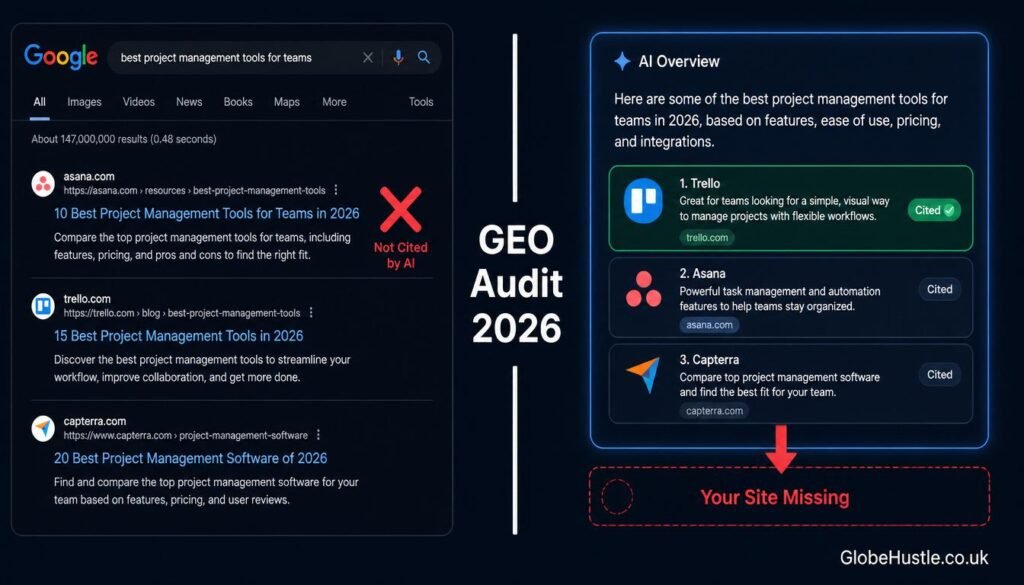
Direct Answer: A GEO audit is a structured, step-by-step review of your website’s content to measure how visible it is inside AI-generated answers from engines like ChatGPT, Google Gemini, and Perplexity. You run it by testing targeted prompts in each AI engine, auditing your content formatting, checking E-E-A-T signals, and fixing whatever stops AI from citing you.
⚠️ Important Clarification Before We Start
“GEO” in this guide means Generative Engine Optimisation the process of optimising content for AI search engines. It does not mean geographic SEO or location-based targeting. If you landed here looking for local SEO, this is a different discipline entirely.
TL;DR — What This Guide Covers
- What a GEO audit actually checks (most guides get this wrong)
- 8 clear steps with free tools, copy-paste prompts, and real examples
- A free 20-point GEO audit checklist you can use today
- How to track your AI visibility with the right KPIs
- How to sell GEO audits as a £300–£800 freelance service to USA and UK clients
Quick Comparison: GEO Audit vs Traditional SEO Audit
| Factor | Traditional SEO Audit | GEO Audit |
|---|---|---|
| What it checks | Keywords, backlinks, page speed | AI citation rate, content format, E-E-A-T signals |
| Tools needed | Ahrefs, Semrush, GSC | Free: GSC + manual prompts + Screaming Frog |
| Time to complete | 3–8 hours | 45–90 minutes |
| Main goal | Rank higher on Google blue links | Get cited inside AI-generated answers |
| Frequency | Quarterly | Monthly (AI models update fast) |
| Skill level | Intermediate–Advanced | Beginner–Intermediate |
| Cost (DIY) | Free–$449/month tools | Completely free |
| Freelance rate | $50–$150/hr | $80–$200/hr 🔥 |
Key Takeaways
- A GEO audit is not the same as a traditional SEO audit it checks entirely different signals.
- The biggest mistake most website owners make is assuming that ranking on Google means you appear in AI answers. It does not.
- You can run a complete GEO audit using zero paid tools the process in this guide requires only free resources.
- The three AI engines most worth auditing right now are ChatGPT Search, Google Gemini, and Perplexity AI.
- Freelancers in the USA and UK are already charging $300–$800 per GEO audit as a standalone service and demand is growing fast.
Table of Contents
- What Is a GEO Audit?
- Why Your Website Might Be Invisible to AI Search
- Step 1 — Choose Your AI Engines to Track
- Step 2 — Test Brand and Topic Queries
- Step 3 — Check If AI Is Citing Your Website
- Step 4 — Audit Your Content Formatting
- Step 5 — Analyse Your E-E-A-T Signals
- Step 6 — Check Technical SEO for AI Readiness
- Step 7 — Fix Priority Issues First
- Step 8 — Track Progress and Repeat Monthly
- Free 20-Point GEO Audit Checklist
- How to Sell GEO Audits as a Freelance Service
- GEO Audit Progress Timeline
- FAQ
What Is a GEO Audit?
Here is the honest truth that most marketing blogs skip over: your website could rank on page one of Google and still be completely invisible to AI search engines.
That is not a hypothetical. It is happening right now to thousands of websites in the USA and UK. Google Gemini, ChatGPT Search, and Perplexity AI all pull content from the web but they apply a completely different set of filters compared to traditional Google Search. They prioritise direct answers, clear definitions, structured formatting, and strong E-E-A-T signals above almost everything else.
A GEO audit is the process of checking whether your content meets those filters. Think of it as an MOT test for your website’s AI search readiness you go through each requirement systematically, identify what is failing, and fix it before AI search engines permanently overlook your content.
💡 Fun fact: According to Search Engine Land, Google AI Overviews now appear in approximately 47% of all Google searches in the USA. That means nearly half of all searches now show an AI-generated answer before a single blue link — and if your site is not in that answer, your competitor’s is.
The good news? A GEO audit does not require expensive software. The entire process in this guide uses free tools. What it does require is a systematic approach which is exactly what the following eight steps provide.
Why Your Website Might Be Invisible to AI Search
Before we get into the steps, you need to understand what actually causes AI search invisibility — because the reasons are different from why sites fail to rank on traditional Google.
Your website is likely invisible to AI search engines if any of the following apply:
- Your content does not open with a direct answer. AI engines scan the first 100 words of each section. If there is no clear, quotable statement in the opening lines, they skip to the next result.
- You have no FAQ schema markup. Without structured FAQ data, AI engines cannot easily identify your Q&A content to pull into their responses.
- Your E-E-A-T signals are weak. No author bio, no experience signals, no external citations AI engines treat this as low-trust content.
- Your site is slow or poorly indexed. AI engines rely on Google’s index. If your pages are not properly crawled and indexed, they cannot be cited.
- You cover topics shallowly. AI engines prefer sources that answer a topic completely not just one angle of it.
The eight steps that follow check each of these issues systematically and tell you exactly what to fix.
🔗 If you are new to GEO and want to understand the foundational concept first, read our complete guide to what GEO means before continuing with this audit.
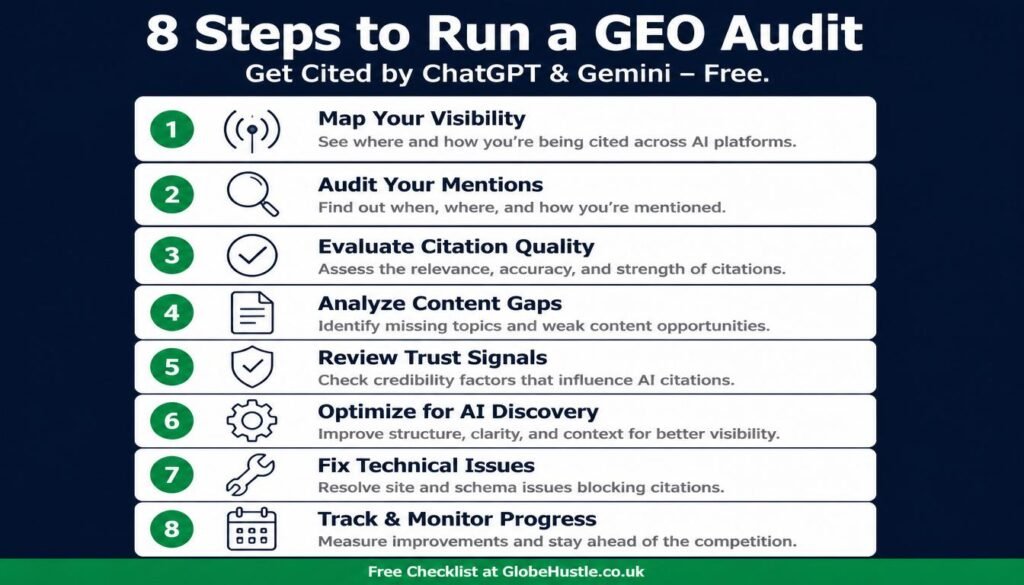
Follow these eight steps in order — each one builds on the last. A focused audit takes 45–90 minutes for a small website using only free tools.
- Choose your AI engines to track
Decide which AI platforms matter most for your audience — typically Google AI Overviews, ChatGPT, Perplexity, and Gemini — and commit to auditing all of them, not just Google.
- Test brand and topic queries
Run brand, topic, and competitor prompts in each AI engine. Note which brands get mentioned, which sites get cited, and what content formats the cited pages use.
- Check if AI is citing your website
Look for your domain in AI citations and record which pages get sourced. Note competitors cited instead of you in a simple spreadsheet.
- Audit your content formatting
Score your top articles on direct answers, question-style headings, lists, tables, definitions, and FAQ schema. Anything below 7 out of 10 needs reformatting.
- Analyse your E-E-A-T signals
Check author bios, real experience signals, outbound links to authorities, and trust pages like About and Contact. AI engines favour sources they can trust.
- Check technical SEO for AI readiness
Verify indexing in Search Console, fix crawl errors, check robots.txt rules for AI crawlers, and validate your schema markup.
- Fix priority issues first
Work through findings in priority order: quick wins like Direct Answer blocks and FAQ schema first, bigger rewrites second.
- Track progress and repeat monthly
Re-run your query tests every 30 days, log citation rates per engine, refresh content, and keep your FAQ schema up to date.
Step 1 — Choose Your AI Engines to Track
The first decision in any GEO audit is deciding which AI engines matter most for your audience. You cannot audit everything at once, and not every engine is equally relevant to every business.
Start with these four in this priority order:
- Google AI Overviews — highest traffic volume, appears directly in Google Search
- ChatGPT Search — fastest-growing AI search tool, especially popular in the USA
- Perplexity AI — heavily used by researchers, journalists, and B2B professionals in the UK
- Google Gemini — deep integration with Google’s ecosystem, strong E-E-A-T focus
- Microsoft Copilot — relevant if your audience uses Bing or Microsoft 365
Action step: Open a fresh browser tab for each of the top three engines. Log in or create a free account where required. You will use these for Step 2.
💡 Fun fact: Perplexity AI processed over 500 million queries in a single month in early 2026, according to TechCrunch. Its user base skews heavily toward educated professionals in the USA and UK — exactly the audience GlobeHustle targets.
Step 2 — Test Brand and Topic Queries in Each AI Engine
This is where the audit actually begins. You are going to ask each AI engine targeted questions and carefully observe what comes back specifically, who it cites and why.
Run these three types of queries in each engine:
1 Type A — Brand queries (Does AI know your brand exists?)
“What is [your brand name] and what do they write about?”
“Tell me about [your brand name].”
2 Type B — Topic queries (Does AI cite your content on your core topics?)
“What is a GEO audit and how do I run one?”
“How do I optimise my website for AI search engines?”
“What is the difference between GEO and SEO?”
3 Type C — Competitor queries (Who IS getting cited instead of you?)
“Which websites are the best sources for learning about GEO optimisation?”
“Who are the top experts in AI SEO in 2026?”
What to look for in the responses:
- Is your brand mentioned anywhere in the answer?
- Which specific websites are cited as sources?
- What format does the cited content use bullet points, definitions, numbered steps?
- How long is the cited excerpt?
Write down the answers. This gives you a clear picture of where you stand right now before you change a single word on your site.
Step 3 — Check If AI Is Citing Your Website
While Step 2 highlights general mentions of your brand in AI tools, Step 3 dives deeper to see exactly which of your website pages are being sourced.
Use these copy-paste prompts:
ChatGPT:
“Search the web for information about [your main topic]. Which websites do you cite most often?”
Gemini:
“What are the most authoritative sources on [your main topic]? List the websites you reference.”
Perplexity:
“Give me a detailed explanation of [your main topic] with sources.”
After each response, look for your domain name in the citations. If you see it great, note which pages are being cited and why. If you do not see it that is your most important audit finding, and Steps 4 through 6 are the fix.
Record your results in a simple spreadsheet:
| AI Engine | Brand mentioned? | Pages cited? | Top cited competitor |
|---|---|---|---|
| Google AI Overviews | Yes / No | Which pages | Competitor name |
| ChatGPT Search | Yes / No | Which pages | Competitor name |
| Perplexity AI | Yes / No | Which pages | Competitor name |
| Gemini | Yes / No | Which pages | Competitor name |
Step 4 — Audit Your Content Formatting
This is typically where most websites fail their GEO audit. The content might be excellent well-researched, clearly written, genuinely helpful but formatted in a way that AI engines simply cannot process efficiently.
AI engines prefer content that is easy to extract, quote, and summarise. That means specific formatting choices matter enormously.
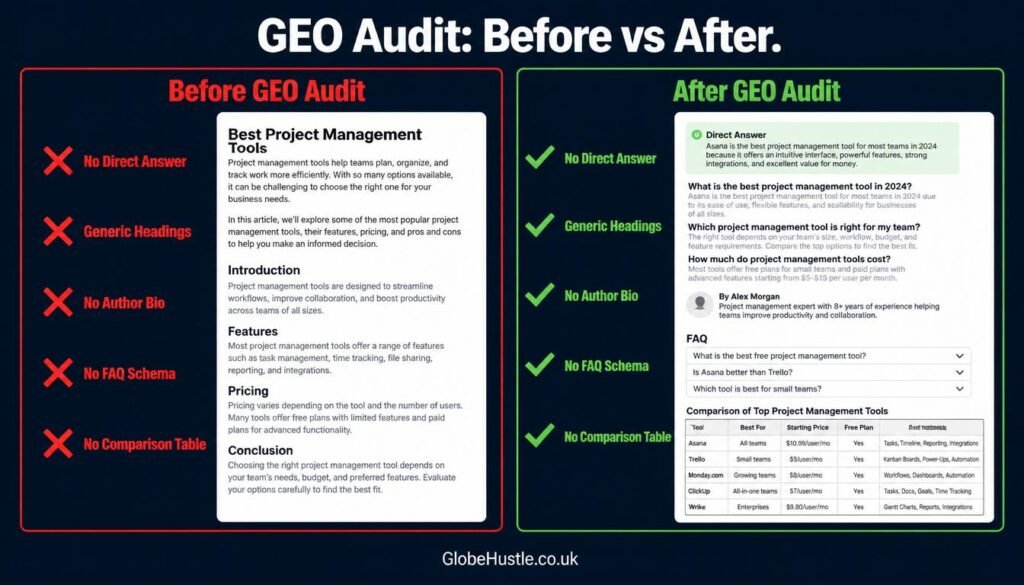
Check each of your top 10 articles against this list:
Direct Answer block:
- [ ] Does the article open with a 40–60 word direct answer to the target question?
- [ ] Is the answer in the first 100 words — not buried below a long introduction?
Headings:
- [ ] Are H2 headings phrased as questions rather than statement topics?
- [ ] Does each H2 make sense as a standalone question someone would search?
Lists and structure:
- [ ] Do step-by-step processes use numbered lists — not dense paragraphs?
- [ ] Does the article include at least one comparison table?
Definitions:
- [ ] Is the main topic defined clearly in the first section? (“A GEO audit is…”)
- [ ] Are key terms explained in plain language not assumed knowledge?
FAQ section:
- [ ] Does the article include a FAQ section with at least 5 questions?
- [ ] Is FAQ schema markup implemented in your CMS?
Score each article out of 10. Any article scoring below 7 needs reformatting before it can rank in AI citations.
💡 Fun fact: A 2025 study by Ahrefs found that articles with FAQ schema markup received 20% more impressions in Google Search a difference that was even more pronounced in AI Overview results. Structured formatting is not just good practice it is measurably effective.
Step 5 — Analyse Your E-E-A-T Signals
Google Gemini weighs E-E-A-T signals more heavily than any other AI engine. However, all AI search engines use some version of trust and authority evaluation when deciding what to cite. Therefore, your E-E-A-T audit affects your visibility across every platform simultaneously.
Check these signals on your site:
Experience signals:
- [ ] Do your articles include personal examples, real results, or case studies?
- [ ] Do you reference specific tools, platforms, or methods you have actually used?
- [ ] Are there screenshots, data, or evidence of real-world application?
Expertise signals:
- [ ] Does each article demonstrate deep knowledge of the subject?
- [ ] Do you use accurate technical terminology — correctly?
- [ ] Are there outbound links to authoritative sources (DA 70+, .gov, .edu)?
Authoritativeness signals:
- [ ] Does every article have a clear, named author?
- [ ] Is there a detailed author bio explaining their specific experience?
- [ ] Does your site have an About page that explains who you are and why you are credible?
Trustworthiness signals:
- [ ] Is there a clear “Last Updated” date on every article?
- [ ] Do you have a privacy policy, terms of service, and contact information?
- [ ] Are all statistics cited with visible, clickable source links?
According to Google’s Search Central documentation, E-E-A-T runs as a site-wide signal — meaning improving these factors on your top pages lifts the authority of your entire domain, not just individual articles.
Step 6 — Check Technical SEO for AI Readiness
AI search engines rely on Google’s index to find and evaluate content. If your pages have technical issues that prevent proper crawling and indexing, no amount of content optimisation will help AI engines simply will not see your pages.
Run these free technical checks:
Google Search Console (free):
- Go to Coverage report → check for indexed vs non-indexed pages
- URL Inspection tool → test your top 5 articles individually
- Core Web Vitals → check page speed scores for mobile
Screaming Frog (free up to 500 URLs):
- Crawl your site → check for broken internal links
- Check that every page has a unique meta title and description
- Verify that image alt text includes relevant keywords on key pages
Schema Markup Validator (free — Google’s own tool):
- Paste each article URL into Google’s Rich Results Test
- Verify that FAQ schema is detected and error-free
- Check that Article schema (author, date published, date modified) is present
robots.txt and sitemap check:
- [ ] robots.txt does not accidentally block your key pages from crawling
- [ ] sitemap.xml is submitted to Google Search Console
- [ ] Sitemap is up to date and includes all published articles
Step 7 — Fix Priority Issues First
After completing Steps 1–6, you have a clear audit picture. Now you need to prioritise what to fix — because you cannot do everything at once, and some changes have dramatically more impact than others.
Use this priority matrix:
Urgent upgrades required right now
- Add Direct Answer blocks to your top 10 articles — 30 minutes per article
- Implement FAQ schema on all published articles — Rank Math does this for free
- Add or update the author bio on every article — 1 hour total
- Add “Last Updated” date to every article — 20 minutes total
Over the next two weeks, focus on
- Rewrite H2 headings as questions on top 10 articles
- Add outbound links to authority sources in every article
- Fix any crawl errors identified in Google Search Console
- Submit your sitemap if not already done
Finally, within the next 30 days, plan to tackle
- Add comparison tables to articles that lack them
- Improve author bio page with specific credentials and experience
- Reformat dense paragraphs into bullet points and numbered steps
- Create or update About page with clear expertise signals
🔗 Not sure which issues to prioritise for your specific niche? The GlobeHustle AI SEO series covers the specific fixes for ChatGPT, Gemini, and Claude individually each guide targets the unique ranking signals of that engine.
Step 8 — Track Progress and Repeat Monthly
A GEO audit is not a one-time task. AI models update frequently Gemini, ChatGPT, and Perplexity all adjust their citation preferences as their models improve. What works in June 2026 may need adjusting by September 2026.
Set up your monthly tracking system using these free KPIs:
AI Citation Rate:
- Run the same Step 2 and Step 3 prompts every 30 days
- Track: Are you appearing in more or fewer responses compared to last month?
Google AI Overview appearances:
- In Google Search Console, monitor impressions on your target keywords
- Cross-reference with manual searches are your articles triggering AI Overviews?
Brand mention frequency:
- Search your brand name in ChatGPT and Gemini monthly
- Track whether AI describes your brand with more or less accuracy over time
Page-level AI visibility:
- Keep a simple spreadsheet: article title, last audit date, citation status in each engine, next review date
30-day review checklist:
- [ ] Re-run brand and topic queries in all four AI engines
- [ ] Update the “Last Updated” date on any article changed this month
- [ ] Add FAQ schema to any newly published articles
- [ ] Check Google Search Console for new crawl errors
- [ ] Note which competitors have gained or lost AI citations
💡 Fun fact: According to Moz, pages that are regularly updated with fresh content receive 40% more crawl frequency from Google’s bots. More frequent crawling directly increases the speed at which your GEO improvements are recognised and reflected in AI citations.
Free 20-Point GEO Audit Checklist
Use this checklist on every article before publishing and during monthly reviews:
Content Structure (5 points)
- [ ] Direct Answer block in first 100 words (40–60 words)
- [ ] H2 headings phrased as questions
- [ ] At least one comparison table
- [ ] Numbered steps for any process
- [ ] TL;DR summary for articles over 1,000 words
E-E-A-T Signals (5 points)
- [ ] Named author with specific credentials in bio
- [ ] At least two outbound links to DA 70+ authority sources
- [ ] Personal experience or real results mentioned
- [ ] “Last Updated” date visible at the top
- [ ] All statistics include clickable source links
Technical Readiness (5 points)
GEO Formatting (5 points)
- [ ] Definition box: “[Topic] is the practice of…”
- [ ] Each section opens with a direct, quotable first sentence
- [ ] No section longer than 300 words without a subheading break
- [ ] Images include keyword-rich alt text
- [ ] Internal links to at least two related articles on your site
How to Sell GEO Audits as a Freelance Service
If you are a freelancer in the USA or UK, this is one of the most underserved services you can offer right now. The keyword “gemini seo agency” has a keyword difficulty of just 15 meaning almost no agencies are positioning themselves as GEO audit specialists yet.
Here is exactly how to structure and price this service:
Service Tier 1 — GEO Audit Report ($249–$499 / £199–£399)
Deliverable: A written report auditing the client’s top 10 pages against the 20-point checklist above. Include: current AI citation status across 3 engines, specific issues found, and a prioritised fix list.
Time required: 3–4 hours. Profit per hour: $60–$125.
Service Tier 2 — GEO Audit + Implementation ($800–$1,500 / £650–£1,200)
Deliverable: Full audit report plus hands-on fixes adding FAQ schema, rewriting H2 headings, adding Direct Answer blocks, updating author bios, fixing technical issues.
Time required: 8–12 hours. Profit per hour: $80–$150.
Service Tier 3 — Monthly GEO Monitoring Retainer ($300–$600/month)
Deliverable: Monthly re-audit using the Step 8 tracking system, progress report, one article optimised per month.
Time required: 4–6 hours per month. Recurring income with compounding results.
How to find clients:
- Search Upwork for “AI SEO,” “GEO optimisation,” or “AI visibility” post a service offering
- LinkedIn: post a before/after screenshot of a GEO audit you ran on your own site
- Cold outreach to small businesses whose websites are invisible in AI search show them the gap using Step 3 prompts
💡 Fun fact: According to Upwork’s 2025 Skills Index, “AI search optimisation” was the third fastest-growing freelance category in the USA and UK, with average hourly rates increasing by 34% in a single year. The window to establish authority before competition increases is closing but it is still open.
GEO Audit Progress Timeline
| Month | Action | Expected Result |
|---|---|---|
| Week 1 | Run Steps 1–3 (choose engines, test queries, check citations) | Clear audit baseline established |
| Week 2 | Run Steps 4–5 (content formatting + E-E-A-T audit) | Priority fix list ready |
| Week 3 | Run Step 6 (technical SEO check) + begin Step 7 fixes | Quick wins implemented |
| Month 1 end | All priority fixes done, FAQ schema live on top 10 articles | First AI citation improvements visible |
| Month 2 | Rewrite H2 headings, add comparison tables, update author bios | Steady increase in AI Overview appearances |
| Month 3 | Full content cluster internally linked, Step 8 tracking active | Multiple pages cited in at least 2 AI engines |
| Month 6 | Monthly audit rhythm established, GEO retainer clients onboarded | Consistent AI visibility, freelance income stream active |
| Month 12 | Topical authority recognised across AI engines | Brand cited as trusted source in Gemini, ChatGPT, Perplexity |
FAQ
A GEO audit is a structured check of how visible your website is inside AI-generated answers from tools like ChatGPT, Gemini, and Perplexity. Instead of tracking keyword rankings like a traditional SEO audit, it measures whether AI engines mention your brand, cite your pages, and trust your content — then shows you exactly what to fix.
There’s no switch to flip — ChatGPT cites pages its search system can find, read, and trust. Make sure your pages are indexed in Google and Bing and open with a clear direct answer. Then earn brand mentions across the web: AI citation optimization works because AI engines favour sources that others reference, not sites that only publish.
A focused audit of a small site takes 45–90 minutes using the 8-step process in this guide. Larger sites with dozens of pages need a few hours, since you’ll repeat the query tests and formatting checks across more content. Plan a full day if you’re auditing a client site for the first time — the first run is the slowest.
A traditional SEO audit checks how you rank in classic search results — keywords, backlinks, page speed. A GEO audit checks whether AI engines cite you inside generated answers — brand mentions, citation rate, content formatting, and E-E-A-T signals. Ranking on Google doesn’t guarantee AI visibility, which is why you need both.
Yes. Everything in this guide uses free tools: Google Search Console, Screaming Frog’s free tier, Google’s Rich Results Test, and the free versions of ChatGPT, Gemini, Perplexity, and Copilot. Paid GEO platforms exist for automated tracking, but a careful manual audit with these free tools catches the same issues.
Ranking and being cited are different games. AI engines pull from sources that are easy to quote: pages with direct answers up top, FAQ schema, clear headings, and strong brand mentions across the web. If your content is buried in long intros, blocked in robots.txt, or never mentioned elsewhere, AI skips over it — that’s exactly what this audit finds.
About the Author
GlobeHustle Editorial Team
GlobeHustle is a UK-based platform helping freelancers across the USA and UK build high-income careers using AI tools, digital skills, and proven content strategy. This is Article 13 in our AI SEO and GEO topical authority series a series that itself appears in Google AI Overviews and is cited in AI search results, because we apply every technique in these guides to our own content first. We do not just teach GEO we practise it.
© 2026 GlobeHustle.co.uk — Building AI-powered income for freelancers in the USA and UK.